
SatAndLight  2.2.2-hubble
Simulation toolkit for space telescopes
Loading...
Searching...
No Matches
snl-sequence.cc File Reference

This program generates an observation sequence. More...
#include "Satellite.h"
#include "IO.h"
#include "Options.h"
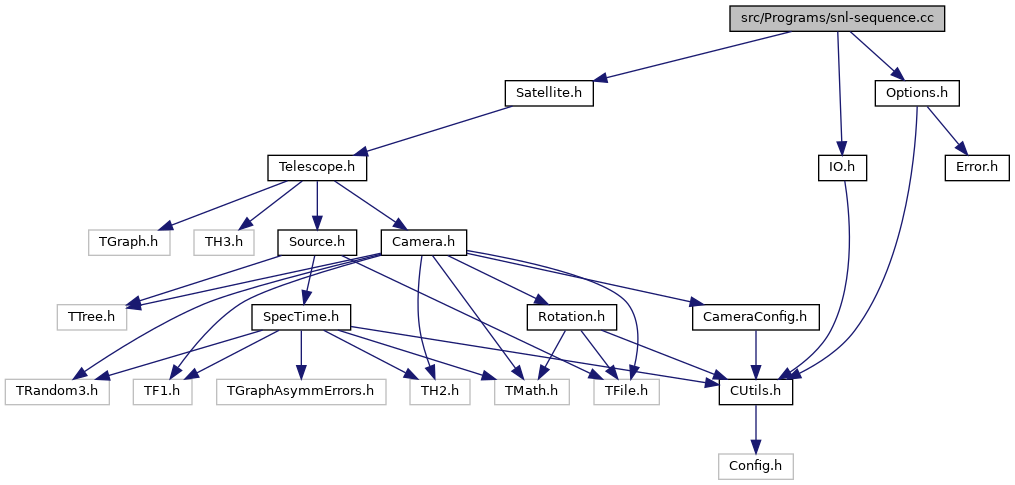
Include dependency graph for snl-sequence.cc:

Classes

class  snl_sequence_parameters
 List of parameters for snl-sequence. More...
 

Functions

int main (int argc, char *argv[])
 This program generates an observation sequence.
 
void snl_sequence_getparameters (snl_sequence_parameters *par, const string optfile)
 Parses option file.
 
void snl_sequence_setsatseq (snl_sequence_parameters *par, Satellite *sat)
 Programs the satellite flight sequence.
 

Detailed Description

This program generates an observation sequence.

Authors
Florent Robinet, flore.nosp@m.nt.r.nosp@m.obine.nosp@m.t@ij.nosp@m.clab..nosp@m.in2p.nosp@m.3.fr

Function Documentation

◆ main()

int main ( int  argc,
char *  argv[] 
)

This program generates an observation sequence.

This program expects exactly one argument which is the path to a text file listing the sequence parameters. If it is not the case or if the file path is invalid, the help message is printed (see printhelp()).

Here is the sequence of actions to generate the observation:

  • The sequence parameters are axtracted. See snl_sequence_getparameters() to get a description of all available sequence parameters.
  • Astrophysical sources are configured (see also Source).
  • The telescopes are configured (see also Telescope).
Parameters
[in]argcNumber of arguments.
[in]argvList of arguments.

◆ snl_sequence_getparameters()

void snl_sequence_getparameters ( snl_sequence_parameters par,
const string  optfile 
)

Parses option file.

snl-sequence parameters are identified with a set of tag/keyword:

[TAG] [KEYWORD] [list of parameters]

The option order does not matter and a line can be commented out with "//". If an option is missing or is invalid, default values are used. The option tag is used to separate option categories.

Satellite parameters

  • The satellite is given a name with:
    SATELLITE NAME [satellite name]
    
    By default, "SAT" is used.
  • Satellite output files are saved in a directory:
    SATELLITE OUTDIR [path to the output directory]
    
    The directory must exist. By default, the current directory is used.
  • The sequence timing is given by 3 options: a start time, a duration and a periodicity in [ms]. The first two parameters define the sequence start and duration. The third parameter specifies the periodicity at which output files are written to disk:
    SATELLITE TIMING [start time] [duration] [time periodicity]
    
    By default, start = 0 ms, duration = 1000 ms, periodicity = 100 ms.
  • The satellite attitude is given by a ROOT file. This root file must contain 3 TGraph objects named "alpha", "beta" and "gamma". These graphs provide the Euler angles \(\alpha\), \(\beta\), and \(\gamma\) as a function of time. Euler angles are defined in the Satellite class.
    SATELLITE ATTITUDE [satellite attitude file]
    
    By default, if the root file is not given or missing, or if the histogram is missing, the Euler angle is fixed to 0.0.

Telescope parameters

  • Multiple telescopes can be configured. They must be given a unique name:
    TELESCOPE NAME [telescope_1 name] [telescope_2 name] [telescope_3 name]
    
    By default, one telescope is used and the name "TEL" is given. The telescope names are used as a tag to configure each of them. Adapt the following syntax with the name of your telescopes. We will use "TEL".
  • Telescope focal length in [mm]:
    TEL FOCALLENGTH [focal length]
    
    By default, the focal length is 1000 mm.
  • Telescope PSF file path:
    TEL PSFFILE [path to psf file]
    
    By default, there is no PSF file. A dirac function positioned at the center is used. The file must be a ROOT file with a PSF object (see the convention for point spread functions). The PSF object can be constructed with the snl-psf.cc application.
  • Telescope effective area for photons \(S_{ph}(E)\). By default, the effective area is constant for all energies and is given by the physical size of the camera. There are 2 possible ways to specify the effective area:
    • the effective area is constant between two energy values.
      TEL EFFAREAPHOTON [Energy min] [Energy max] [Effective area]
      
      Energies are given in \(\mathrm{keV}\) and the effective area in \(\mathrm{mm}^2\).
    • The effective area is given as a TGraph in a ROOT file. The x-axis is used for the energy in \(\mathrm{keV}\), the y-axis is used for the effective area in \(\mathrm{mm}^2\).
      TEL EFFAREAPHOTON [Path to root file] [TGraph name]
      
  • Telescope effective area for cosmic rays \(S_{co}(E)\). By default, the effective area is constant for all energies and is given by the physical size of the camera. There are 2 possible ways to specify the effective area:
    • the effective area is constant between two energy values.
      TEL EFFAREACOSMIC [Energy min] [Energy max] [Effective area]
      
      Energies are given in \(\mathrm{keV}\) and the effective area in \(\mathrm{mm}^2\).
    • The effective area is given as a TGraph in a ROOT file. See the effective area definition.
      TEL EFFAREACOSMIC [Path to root file] [TGraph name]
      
  • Telescope acceptance for photons \(A_{ph}(\cos\theta, \varphi)\). By default, the acceptance is uniform and equal to 1 for \(\theta < 0.5 \mathrm{rad}\). There are 2 possible ways to specify the acceptance:
    • the acceptance is uniform and equal to 1 in an opening angle:
      TEL ACCPHOTON [Half opening angle]
      
      The half opening angle should be given in \(\mathrm{rad}\).
    • The acceptance function is given as a TH2F in a ROOT file. See the acceptance definition.
      TEL ACCPHOTON [Path to root file] [TH2F name]
      
  • Telescope acceptance for background photons \(A_{ph}(\cos\theta, \varphi)\). By default, the acceptance is uniform and equal to 1 for \(\theta < 0.5 \mathrm{rad}\). There are 2 possible ways to specify the acceptance:
    • the acceptance is uniform and equal to 1 in an opening angle:
      TEL ACCBACKGROUND [Half opening angle]
      
      The half opening angle should be given in \(\mathrm{rad}\).
    • The acceptance function is given as a TH2F in a ROOT file. See the acceptance definition.
      TEL ACCBACKGROUND [Path to root file] [TH2F name]
      
  • Telescope acceptance for cosmic rays \(A_{co}(\cos\theta, \varphi)\). By default, the acceptance is isotropic and equal to 1. To specify another acceptance function, use:
    TEL ACCCOSMIC [Path to root file] [TH2F name]
    
    The acceptance function is given by a 2-dimensional histogram as described in the acceptance definition.

Camera parameters

There is one camera for each telescope. To identify the telescope associated to a camera, the option tag is given by the name of telescope followed by "_CAM". For example, if the telescope name is "TEL", the tag for the corresponding camera options is "TEL_CAM". In the following, we will "TEL_CAM" as a tag.

  • The camera size is given by 3 numbers: size along the x-axis (telescope axis), the y-axis and the z-axis. Sizes are given in [mm] as double precision numbers.
    TEL_CAM SIZE [x-size] [y-size] [z-size]
    
    By default, the camera size is 1 [mm] x 1 [mm] x 1 [mm].
  • The camera number of pixels is given by 2 numbers: the number of pixels in the Y direction and in the Z direction
    TEL_CAM NPIXELS [N_y] [N_z]
    
    By default, the camera number of pixels is 64 x 64.
  • The camera pixel amplitude is encoded over N bits. This parameter is provided with:
    TEL_CAM NBITS [N bits]
    
    By default, the camera number of bits is 8.
  • It is possible to introduce dead pixels (zero amplitude). To declare N randomly chosen dead pixels, use:
    TEL_CAM NDEADPIXELS [N]
    
    By default, the camera number of dead pixels is 0.
  • It is possible to introduce bright pixels (max amplitude). To declare N randomly chosen bright pixels, use:
    TEL_CAM NBRIGHTPIXELS [N]
    
    By default, the camera number of bright pixels is 0.
  • The camera integration time (exposure time) [ms] must be specified as well as the time periodicity for taking pictures [ms]:
    TEL_CAM TIMING [integration time] [time periodicity]
    
    By default, the camera integration time and time periodicity is 200 ms.
  • The amplitude dark noise of camera pixels can be configured in two ways:
    • It follows a random Gaussian distribution. The parameters of this distribution, \(M\) (mean) and \(\sigma\) (sigma), can also be drawn from a Gaussian distribution. The parameters of these distributions can be provided by 4 numbers:
      • Mean value for \(M\)
      • Sigma value for \(M\)
      • Mean value for \(\sigma\)
      • Sigma value for \(\sigma\)
        TEL_CAM PIXELDARKNOISE [noise 1] [noise 2] [noise 3] [noise 4]
        
        By default, the camera dark noise parameters are defined in Camera::SetPixelDistributions().
    • The amplitude dark noise is provided as a map saved in a ROOT file. In that case the noise map is a TH2S ROOT object, where bins represent the camera pixels: X axis = Y camera coordinate, and Y axis = Z camera coordinate. The bin content is the pixel noise mean value. The bin error is the pixel noise standard deviation.
      TEL_CAM PIXELDARKNOISE [Path to root file] [TH2S name]
      
  • The amplitude read noise of camera pixels can be configured in two ways:
    • It follows a random Gaussian distribution. The parameters of this distribution, \(M\) (mean) and \(\sigma\) (sigma), can also be drawn from a Gaussian distribution. The parameters of these distributions can be provided by 4 numbers:
      • Mean value for \(M\)
      • Sigma value for \(M\)
      • Mean value for \(\sigma\)
      • Sigma value for \(\sigma\)
        TEL_CAM PIXELREADNOISE [noise 1] [noise 2] [noise 3] [noise 4]
        
        By default, the camera read noise parameters are defined in Camera::SetPixelDistributions().
    • The amplitude read noise is provided as a map saved in a ROOT file. In that case the noise map is a TH2S ROOT object, where bins represent the camera pixels: X axis = Y camera coordinate, and Y axis = Z camera coordinate. The bin content is the pixel noise mean value. The bin error is the pixel noise standard deviation.
      TEL_CAM PIXELREADNOISE [Path to root file] [TH2S name]
      
  • The pixel gain used to convert the raw amplitude to energy can be defined in several ways:
    • Overall gain for all pixels
      TEL_CAM GAIN [gain]
      
  • The spatial resolution (Y/Z) to distribute the photon energy over the pixels is described by 2 parameters: \(\sigma_y\) and \(\sigma_z\). They describe the width of the 2D Gaussian used to distribute the photon energy. These quantities are measured in number of pixels.
    TEL_CAM PHOTONRESY [sigma_y]
    TEL_CAM PHOTONRESZ [sigma_z]
    
    By default, \(\sigma_y=1\) and \(\sigma_z=1\)
  • Cosmic rays loose a fix amount of energy per hit pixel. This parameter measures the energy lost by the particle for each crossed pixel in [keV].
    TEL_CAM COSMICELOSS [energy loss]
    
    By default, energy loss = 1 keV per pixel.

Astrophysical source parameters

  • Multiple astrophysical sources can be configured. They must be given a unique name:
    SOURCE NAME [source_1 name] [source_2 name] [source_3 name]
    
    By default, no source is defined. The source names are used as a tag to configure each of them. Adapt the following syntax with the name of your source. We will use "SRC".
  • Source type: "PHOTON", "COSMIC", or "BACKGROUND".
    SRC TYPE [type]
    
    By default, the source type is "PHOTON".
  • Source sky position: declination in [deg], must be in (-90, +90), right-ascension in [deg], must be in (0, 360). If exactly 2 parameters are provided, the source position is assumed to be point-like and to be time-independent. The source location can also be parameterized as a sperical cap centered on the source main direction (also time-independent). The cone openening angle [deg] from the main axis can be given as a third parameter (optional parameter).
    SRC POSITION [declination angle] [right ascension angle] [cone angle]
    
    By default, the declination angle is +90 deg, the right ascension angle is 0 deg, and the cone angle is 0 deg = point-like source located at the North celestial pole.
  • Source SpecTime object used to describe the astro-particle production. It must be provided in a ROOT file the path of which is provided with:
    SRC SPECTIME [path to ROOT file]
    
    This option is required for all sources. The SpecTime object is a TH2D object with name "sp_flux" saved in the ROOT file.
    See also
    The SpecTime definition. You can also check the user application (snl-spectime.cc) to generate this input.

◆ snl_sequence_setsatseq()

void snl_sequence_setsatseq ( snl_sequence_parameters par,
Satellite sat 
)

Programs the satellite flight sequence.

The attitude root file given in the option file is opened and 3 TGraph are extracted: "alpha", "beta" "gamma". These graphs provide the Euler angles \(\alpha\), \(\beta\), and \(\gamma\) as a function of time. Euler angles are defined in the Satellite class. If the root file is missing or graphs cannot be extracted, the Euler angles are taken to be 0.

Parameters
[in]parParameter structure.
[in]satSatellite structure.